
The contractor leak

A good job can disappear before you even quote it.

This is the normal mess for remodelers, builders, roofers, landscapers, painters, and trades who are busy doing the actual work.

  1. A homeowner calls, texts, or fills out a form after seeing your work.
  2. The project details land in three places: your phone, your inbox, and someone's memory.
  3. You are on a job, so the callback waits until tonight or tomorrow.
  4. Another contractor answers first, books the walkthrough, and starts building trust.
  5. You finally quote from scattered notes, miss a detail, or forget the follow-up.
  6. A $12k-$40k job turns into a dead lead, a stale quote, or a price fight you should not have been in.
The BayoSys flow

Every lead gets a job path before it gets cold.

The goal is not another app to babysit. The goal is a cleaner handoff from interest to estimate to deposit to project record.

  1. The website or intake form captures project type, address, photos, timeline, budget range, and best callback window.
  2. BayoSys creates the contact, job request, pipeline stage, and next-action task automatically.
  3. You or your estimator can see what matters before calling back.
  4. Quote, deposit, invoice, and payment status stay attached to the same customer record.
  5. Follow-up reminders keep the lead warm until they say yes, no, or not yet.
  6. You can look at one screen and know who needs a quote, who needs a deposit, and which jobs are slipping.

Lead capture

Stop forcing homeowners to explain the same job twice. The intake should capture the details that decide whether the job is worth your time.

  • Project type, address, timeline, budget range
  • Photos, notes, and callback window
  • Lead source and urgency captured up front

Quote requests

A quote request should feel like the start of a job record, not a loose message sitting in somebody's phone.

  • Quote-ready scope details
  • Estimator next action
  • Status for waiting, quoted, won, or stale

CRM and pipelines

Contractors lose money when every lead looks equally urgent. Pipeline stages show what needs a call, estimate, deposit, or follow-up.

  • New lead, site visit, quoted, deposit due, scheduled
  • Customer notes and activity in one place
  • Owner can see stuck deals before they die

Deposits and invoices

Money should stay attached to the job. Deposits, invoices, payment status, and follow-up belong beside the customer and project notes.

  • Deposit or invoice path from the record
  • Payment status visible before scheduling
  • Less chasing, fewer awkward money texts

Project notes

The job handoff should not depend on memory. Notes, photos, scope, customer expectations, and payment context stay tied together.

  • Photos and scope details stay with the job
  • Team sees what was promised
  • Future follow-up has real context

System preview

See the connected workflow before launch.

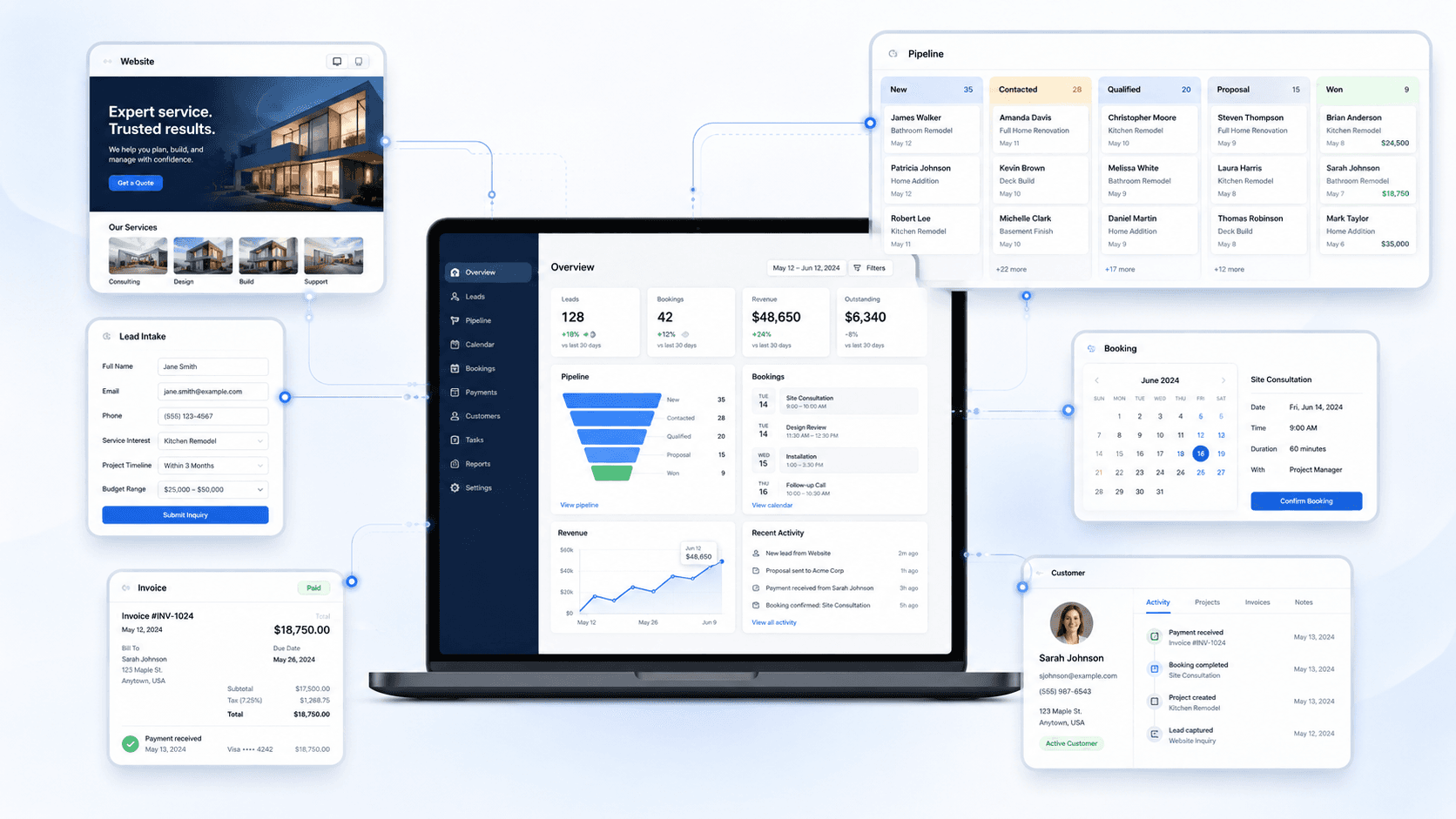
This is the kind of operating view BayoSys connects: site, intake, CRM, payments, and follow-up with context.

BayoSys operations view showing connected lead intake, CRM, booking, payments, and customer records

Starting points

Start with the full system, CRM access, or a product-specific workflow.

Request access and tell us what needs to be connected first.

Request Access